Create a Subscription (New Subscriber)
Create a Subscription (New Subscriber)
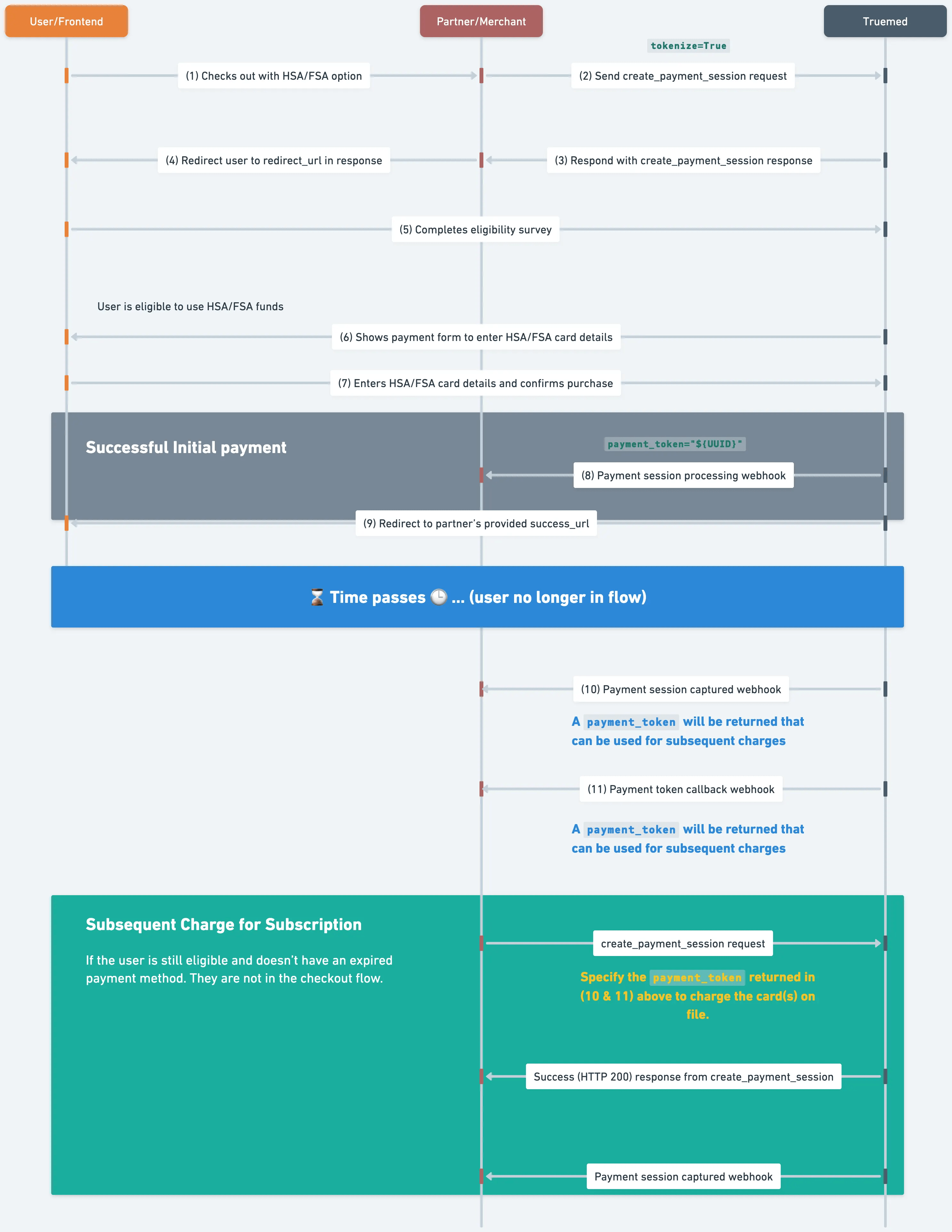
To implement subscriptions with Truemed’s payment_token API, partner backends should create a payment_token and redirect the customer to Truemed’s checkout flow via the redirect_url included in the response to create_payment_session. The customer needs to be present during the flow to store their payment method for future use.
Free trials are enabled by setting total_amount to 0 and providing display_next_bill_info when tokenize=True
See the create_payment_session API reference for more detailed field information.
The order of operations is as follows:
1. Create a payment_token
Call create_payment_session to begin the process of provisioning a token that can be used for subsequent charges.
- In the request, an optional
metadatastring can be provided to track/reference this session later (e.g. customer ID, subscription plan, etc.). Metadata provided on creation will be echoed back via thepayment_token_callbackas well as thepayment_session_callback. - If the
payment_tokenis created as part of a free trial (e.g.total_amount=0anddisplay_next_bill_infoare provided in the API call tocreate_payment_session), the resultingpayment_session_idshould be stored and only subsequently fulfilled upon receipt of thepayment_session_completewebhook as called out in the Payments Overview guide. - In the case of failure, Truemed will provide an
errorenum and amessageoutlining the error — these are particularly useful during development.
2. User completes the Truemed survey and stores payment details
- In the case of free trials, users will be shown information about the next bill amount and next bill date as provided in the
display_next_bill_info.total_amountanddisplay_next_bill_info.datefields when entering their payment information. - Regardless of whether free trials are being used, the user will be shown information about the items they are subscribing to as described in the call to
create_payment_session.
3. User is redirected back to the success_url
User is redirected back to the success_url provided in the call to create_payment_token.
- NOTE: The user will only be redirected to the
failure_urlprovided if they click “Cancel” while on the Truemed survey or checkout pages. - The user should be shown a “Thank You” or order confirmation page
- IMPORTANT: DO NOT create fulfillment requests to process or ship orders/free-trials until a
payment_session_completewebhook with a status ofcapturedis received.
- IMPORTANT: DO NOT create fulfillment requests to process or ship orders/free-trials until a
At this point, the user is no longer present and has been told their subscription has been placed successfully. The following webhooks will be issued asynchronously:
payment_session_callback
- This webhook will be called multiple times to indicate that the
payment_sessionhas been paid-for (or payment has been successfully stored in the case of free-trials), but shouldn’t be fulfilled until the webhook indicates a status ofcaptured. - The full lifecycle of a
payment_session(and possible failure scenarios) is outlined in our Payments Overview guide. - WARNING: In the rare case that the user successfully completes the survey, but a Letter-of-Medical-Necessity is not issued, the
payment_sessionwill be moved to arejectedstate and the end-customer should be notified that the order will not be fulfilled. The webhook will still be issued with thestatusfield set torejected. - NOTE: This guide doesn’t outline the
statuschange flow for manual/delayed capture, as that is covered in the Manual/Delayed Capture guide. The core requirement remains the same in either case: orders must not be fulfilled until receiving a webhook withstatus=captured.
payment_token_callback
- This webhook payload will contain the
payment_tokenand also a reference to thepayment_session_idthat was returned in Step (1) above. Thepayment_session_idshould be stored and associated with the end-customer in partner subscription-management systems. - As outlined above, there are rare cases in which a Letter-of-Medical-Necessity (LMN) is not issued, in which case this webhook will never be issued as a valid
payment_tokenwas never successfully provisioned.
This flow is outlined in the diagram below: