

Subsequent Billing Periods
For subsequent billing periods, payment_sessions can be created via the
create_payment_session endpoint by providing the
payment_token in the call. The user doesn’t need to be present as their on-file payment method will be charged.
As above, orders should not be fulfilled until the
payment_session_complete webhook has been
received with a status of captured.
To avoid failures due to payment method expiration or subscription modifications (such as changing items in the
subscription) no longer being eligible, leverage the
update_payment_token endpoint in a subscription-management
user-portal when updating items in the cart. These flows are outlined below.
Failure scenarios should be communicated to the customer via email and addressed as outlined below. These are best avoided by storing the LMN expiration date and CC expiration dates and prompting the user to update their payment method or take another health survey to re-qualify prior to getting the exception at time of billing.
Failure to Charge
Outside of the user failing to qualify, there are several classes of failures that can occur when creating subsequent charges for a subscription.
- The user needs to update their card information
- Expired card
- Declined card
- Missing a normal credit card to cover the cost of ineligible items
- The user needs to re-qualify, for one of a few reasons:
- Their existing Letter of Medical Necessity is > 12 months old
- The items in their subscription have changes that don’t qualify under their existing Letter of Medical Necessity
- Truemed has deemed it necessary for the user to retake the survey for any other reason
In all cases, Truemed will return an enum indicating the failure type and a redirect URL to be provided to the customer via email or shown in a dashboard. The enum allows partners to tune user messaging (“Your card has expired, click here to update” or “You must requalify with Truemed to continue to use your HSA/FSA”).
Partners can leverage the next_action enum to tune messaging to customers
More generic failures
⚠️ Outside of these two, partners may never receive a webhook on the first call create_payment_session with
tokenize=True
- This indicates the user never completed either the telehealth survey, or did not enter their card info. It can also mean that the user didn’t qualify for the items in their cart/subscription based on their answers.
- This isn’t specific to subscriptions and can happen with any payment session.
Updating Payment Method
In the case of an expired payment, partners will receive an HTTP 422 error code when calling
create_payment_session and the response body will contain
a next_action: UpdatePaymentMethod and a redirect_url as outlined in the flow below:

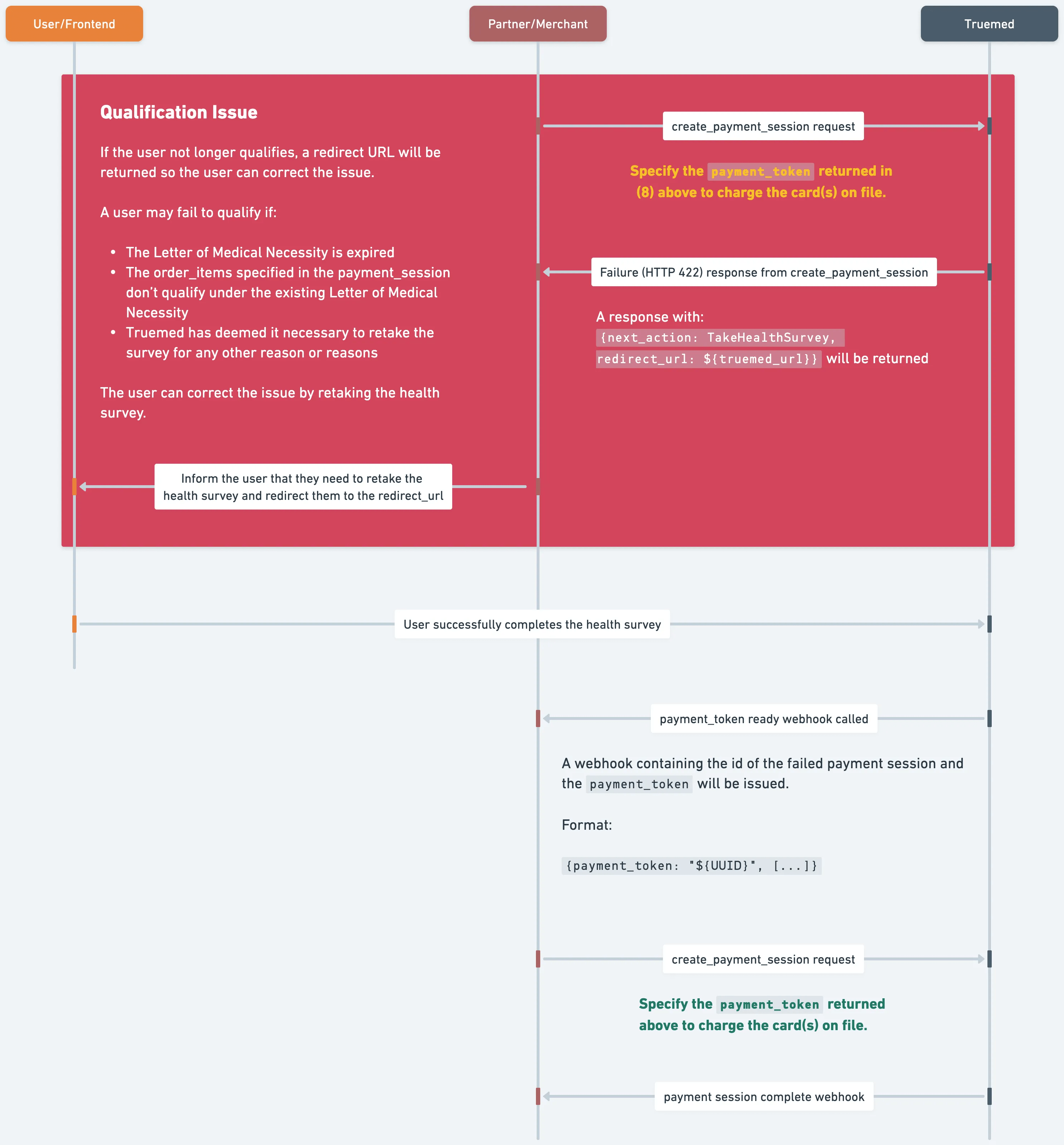
Customer needs to re-qualify
Similar to the case above, if the customer needs to re-qualify, partners will receive an HTTP 422 error code when
calling create_payment_session and the response body will
contain a next_action: TakeHealthSurvey and a redirect_url as outlined in the flow below:
Failure Recovery
Upon the user’s correction of the failure cases above, a Payment Token Webhook call will be made to the partner with
the payment_token used when creating the failing payment session, and a failed_payment_session_id.
At this point, the partner should create a new payment_session using the payment_token returned in this
webhook. If the partner attempts to create a new payment_session with the existing payment_token before
successfully receiving the webhook, the same error will be returned (indicating the user action is still needed).