

Reconciliation & Truemed Order Details
Reconciliation & Truemed Order Details
Overview
During onboarding, Truemed creates a Stripe Express account for your store. This is a lightweight setup that requires standard KYC and allows you to link your bank account.
Truemed processes payments on your behalf and sends payouts for order totals, minus Truemed fees, to this linked bank account. Payouts are issued in batched transfers on a rolling 2-day basis, and refunds are also processed through this same account.
Prefer to automate this instead of downloading CSVs? The
Reconciling Payments with the API guide pulls the same
charge, refund, fee, dispute, and payout data programmatically — and the payment_id field on
each row is the same Shopify ID you match below.
The Developers tab isn’t enabled by default for Shopify merchants. To generate an API key, contact your Truemed point of contact or merchants@truemed.com and ask to have developer-portal access enabled on your account. Once it’s turned on, the Developers tab appears in your dashboard and you can create a key there.
Using the Truemed Dashboard
Truemed provides a partner dashboard to help you monitor order activity and support reconciliation.
Within the Payments tab of the dashboard, you’ll find a Download Report button. This report contains the key fields needed to reconcile Truemed payments with your Shopify orders and bank deposits.
Column Guide to Truemed Portal Export
Order ID: the ID of the order in Truemed’s system - reference this in any support inquiries.
Shopify ID: the payment reference ID from Shopify. The matching identifier can be found under “Payment Reference” on the Shopify export.
Charge Date: the date the customer was charged for their order.
Charge Type: the type of transaction. Can take values of charged, refunded, canceled, partially refunded, disputed, and expired.
Name: the name supplied by the customer during checkout with Truemed.
Email: the email supplied by the customer during checkout with Truemed
Order Total: the order total inclusive of sales tax, shipping, and fees.
Fee: the total fees that Truemed deducted from the order.
Payout Date: the date that Stripe initiated the payout of money to your bank.
Payout ID: the payout ID from Stripe that this order’s funds were included in.
Order Items: the items the customer purchased.
Reconciling Orders with Shopify
To reconcile Truemed payments:
- Download the payments report from the Truemed dashboard - you will receive it in your email inbox.
- Match the Shopify Order ID column in the Truemed report with your Shopify order data.
- The ID on Shopfy will be shown under an order as “Payment ID”.
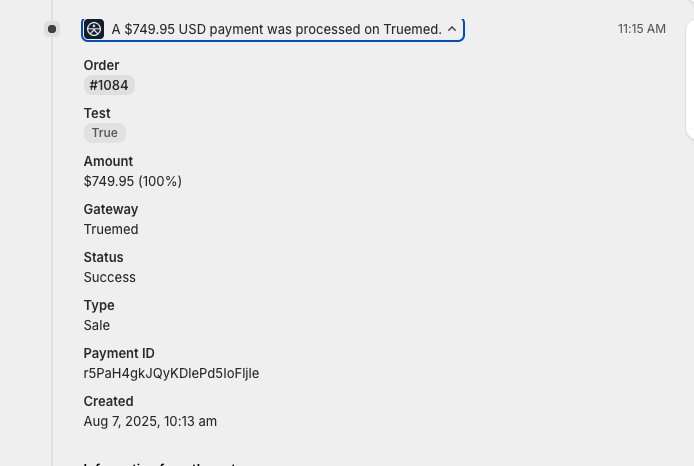
- In the Shopify order export, the ID will be listed under the column “Payment Reference”.
- For each order, you’ll be able to see:
- the associated payout batch
- the payout date
- any refund or dispute activity, with corresponding payout batches and dates
This allows you to tie individual Shopify orders to Truemed payout deposits and track when funds were settled to your bank account.